A route may look perfect on a dispatcher’s screen and still fail in the parking lot. The driver receives an old spreadsheet, a customer adds a stop by phone, and nobody is sure whether the last delivery was completed. By noon, the original plan exists in three different versions.
This is not mainly a navigation problem. It is a handoff problem. Small delivery teams need one clear way to turn a stop list into assigned routes, give each driver the right version, and see what has actually been completed.
The morning spreadsheet is only the starting point
Dispatchers often begin with a CSV file, an order export, or a list copied from another system. Retyping those addresses one by one wastes time and creates avoidable errors. A missing digit can send a driver across town; a duplicated line can create a second trip to the same customer.
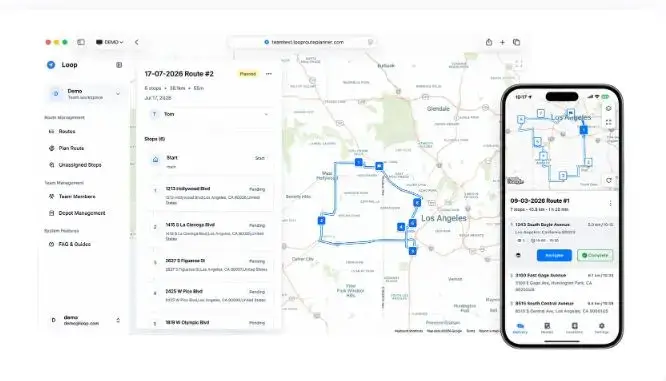
Loop Teams lets dispatchers add multiple addresses in bulk from the web, optimize the stop order, and save each route in a shared workspace. The process keeps the original list useful instead of turning it into another cleanup project.
Optimization should be treated as a strong first draft, not an untouchable answer. Dispatchers still need to account for priority customers, delivery windows, vehicle capacity, and local knowledge. The useful part is starting with a sensible order and changing only the exceptions.
Assignment should replace the group chat
When routes are distributed through screenshots or chat messages, version control disappears. A driver may follow the first image while the dispatcher assumes everyone saw the revised list.
A cleaner workflow assigns each route to a named driver from the dashboard. The driver receives the route in the Loop app, with the stop order already attached. This reduces the chance that two people cover the same area or that a late change reaches only part of the team.
The system is designed around a simple division of work: dispatchers plan and assign on the web; drivers follow and complete stops in the mobile app. Everyone works from the same route rather than maintaining separate copies.
Progress answers the question before the phone call
Many delivery teams still depend on repeated “Where are you now?” calls. Those interruptions slow the dispatcher and the driver, and the answer may be outdated five minutes later.
As drivers mark stops complete, dispatchers can monitor active routes and completed stops from the web dashboard. This does not eliminate communication, but it makes routine status checks visible. A phone call can be reserved for an exception: a closed location, a rejected delivery, or a stop that needs to be reassigned.
That visibility is also useful when a customer asks for an update. The office can check progress instead of calling the driver and waiting for a response.
Shared route history improves the next day
A finished route contains useful operational knowledge. It shows which locations repeat, how the team divided the territory, and where changes were needed. Shared locations and route history make that work available for the next planning cycle.
For parcel delivery, food distribution, wholesale drops, field service, and other multi-stop operations, yesterday’s route can become a practical template. The dispatcher can reuse familiar locations, adjust the changed orders, and avoid rebuilding the day from zero.
Good delivery software removes uncertainty
The value of a delivery route planner is not limited to drawing a shorter line on a map. For a team, the larger gain comes from reducing uncertainty at each handoff: which addresses are included, who owns the route, which version is current, and which stops are finished.
A reliable daily workflow is straightforward: import the stops, review the optimized order, assign the routes, let drivers complete them in the app, and monitor progress from the dashboard. When those steps stay connected, the team spends less time reconciling lists and more time completing deliveries.